Asking Windows what the printer will actually print
GDI origin is the printable rectangle, not the sheet. AlvaLabel asks GetDeviceCaps for the hardware margins and paints the rest of the job in millimetres.
AlvaLabel is a desktop label designer because a browser tab cannot see the physical printer. This post is the Windows side of that: how we read hardware margins, why a naive blit shifts the whole sheet, and how a millimetre canvas still has to know display DPI.
Summary
Problem. Office inkjet and laser printers do not print to the edge of the page. The unprintable band is a hardware fact — paper path, rollers, the head’s travel — and it is different for every driver. A web designer has no API for it. The generic Windows print dialog has the numbers, but it will not tell a layout tool before you waste a sheet of HERMA 4429. If you then draw the page at GDI’s (0, 0), you have a second bug: (0, 0) is the corner of the printable rectangle, not the corner of the paper, so every label shifts by the hardware offset.
Solution. Open a printer DC for the stock’s paper (A4 or US Letter), read GetDeviceCaps, and treat the result as millimetres:
- left / top =
PHYSICALOFFSETX/Y - right / bottom =
PHYSICALWIDTH−HORZRES−PHYSICALOFFSETX(and the same on Y)
Paint that rectangle on the sheet as a red or green wash. Rasterize the full sheet to PNG. Blit with StretchDIBits at (−offsetX, −offsetY) and size (physicalWidth, physicalHeight) so the bitmap sits on the paper, not in the printable hole.
The rest of this note is why the fast path skips DocumentPropertiesW, why the overlay uses a 0.2 mm epsilon, and why the designer’s millimetres are not 96/25.4.
Two different “pages”
A label stock is a rectangle of paper with a die-cut grid. Avery 5160, Zweckform L7173, HERMA 4429 — the manufacturer publishes cell size, columns, rows, and (if you are lucky) the tab between cells. That grid is relative to the sheet.
GDI’s page is not the sheet. After CreateDC for a printer:
| Cap | Meaning |
|---|---|
PHYSICALWIDTH / HEIGHT | Size of the paper, in device pixels |
HORZRES / VERTRES | Size of the printable rectangle |
PHYSICALOFFSETX / Y | Offset from the physical top-left to the printable top-left |
LOGPIXELSX / Y | Device DPI, so those pixel counts become millimetres |
The printable rectangle is strictly inside the paper. Convert offsets with (dots / dpi) × 25.4. Right and bottom margins are whatever is left after subtracting the printable size and the top-left offset. On a typical Epson ET-2820 that is a few millimetres on each edge — enough to clip the outer row of a tight A4 pack.
AlvaLabel keeps the stock grid in millimetres and overlays the printable rectangle on the same coordinate system. If the printer’s inset is larger than the stock’s sheet margin, the die sits in the unprintable band: red. If the stock’s margin is wider, the labels are clear: green.
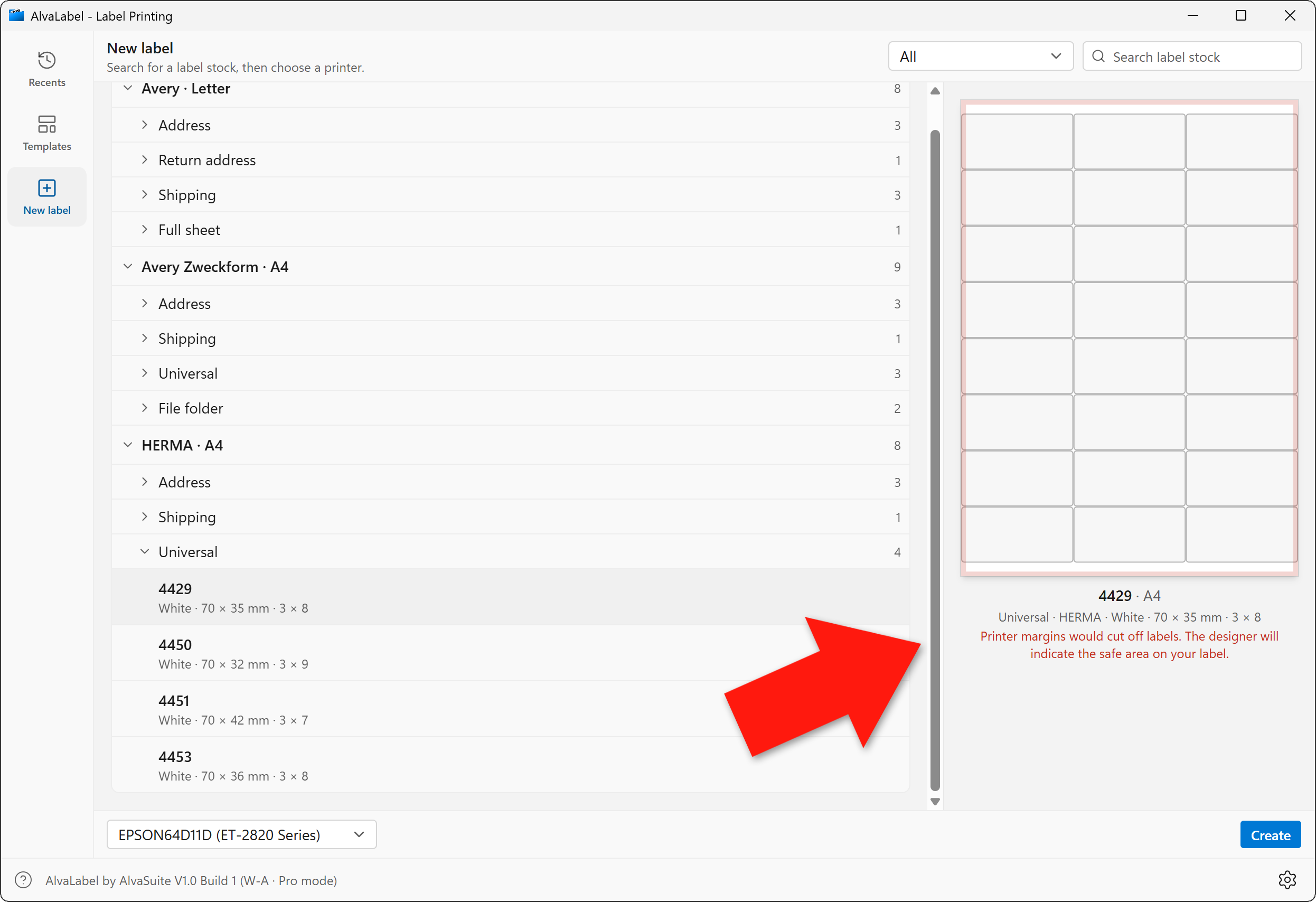
Red: this HERMA 4429 sheet would be clipped by the Epson’s hardware margins. The designer then marks the same safe area on the label itself.
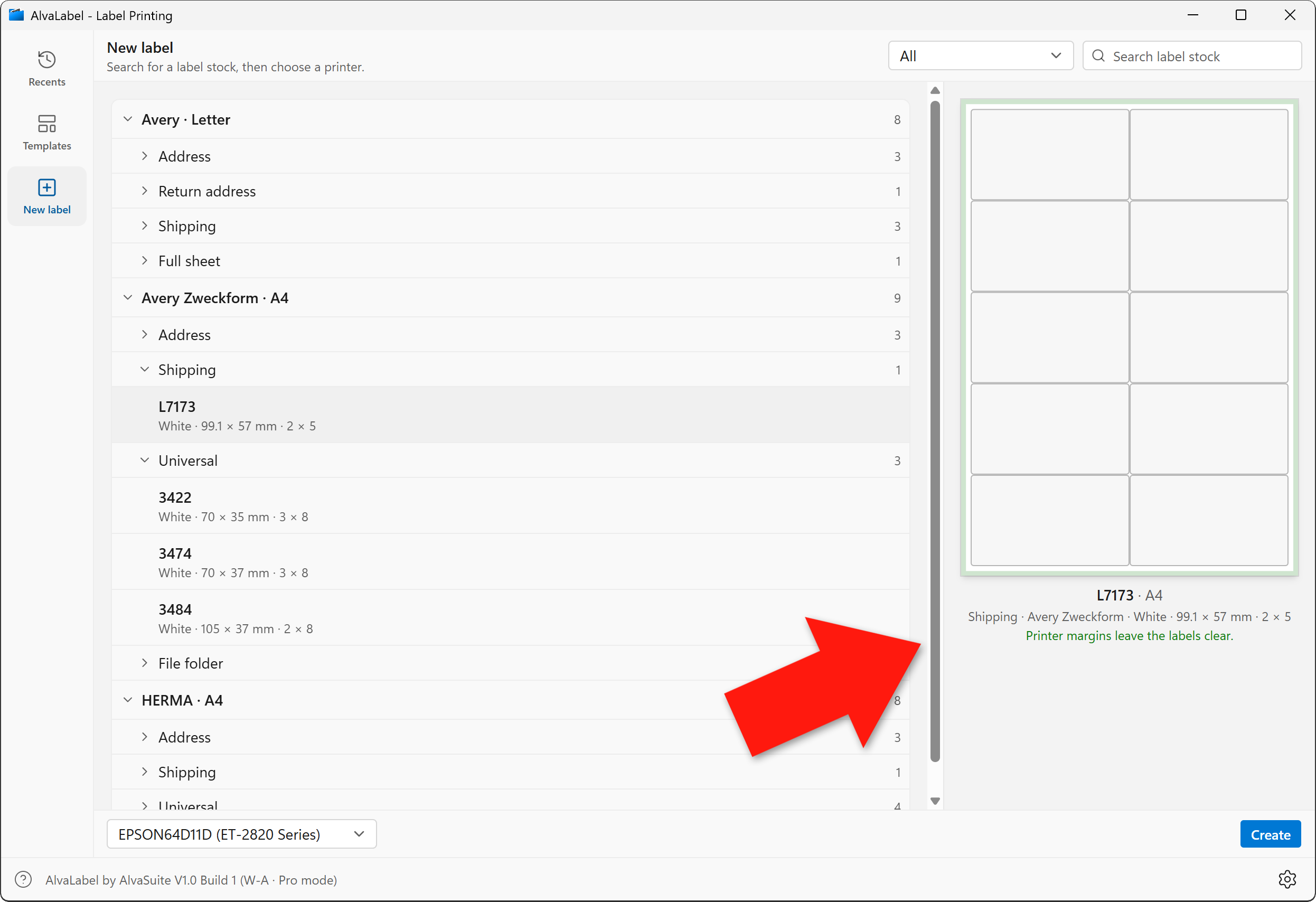
Green: Avery Zweckform L7173 sits inside the printable area, so the labels print in full.
In the designer, the unsafe, clipped areas are indicated in pale red so that users can keep their designs within the safe area:
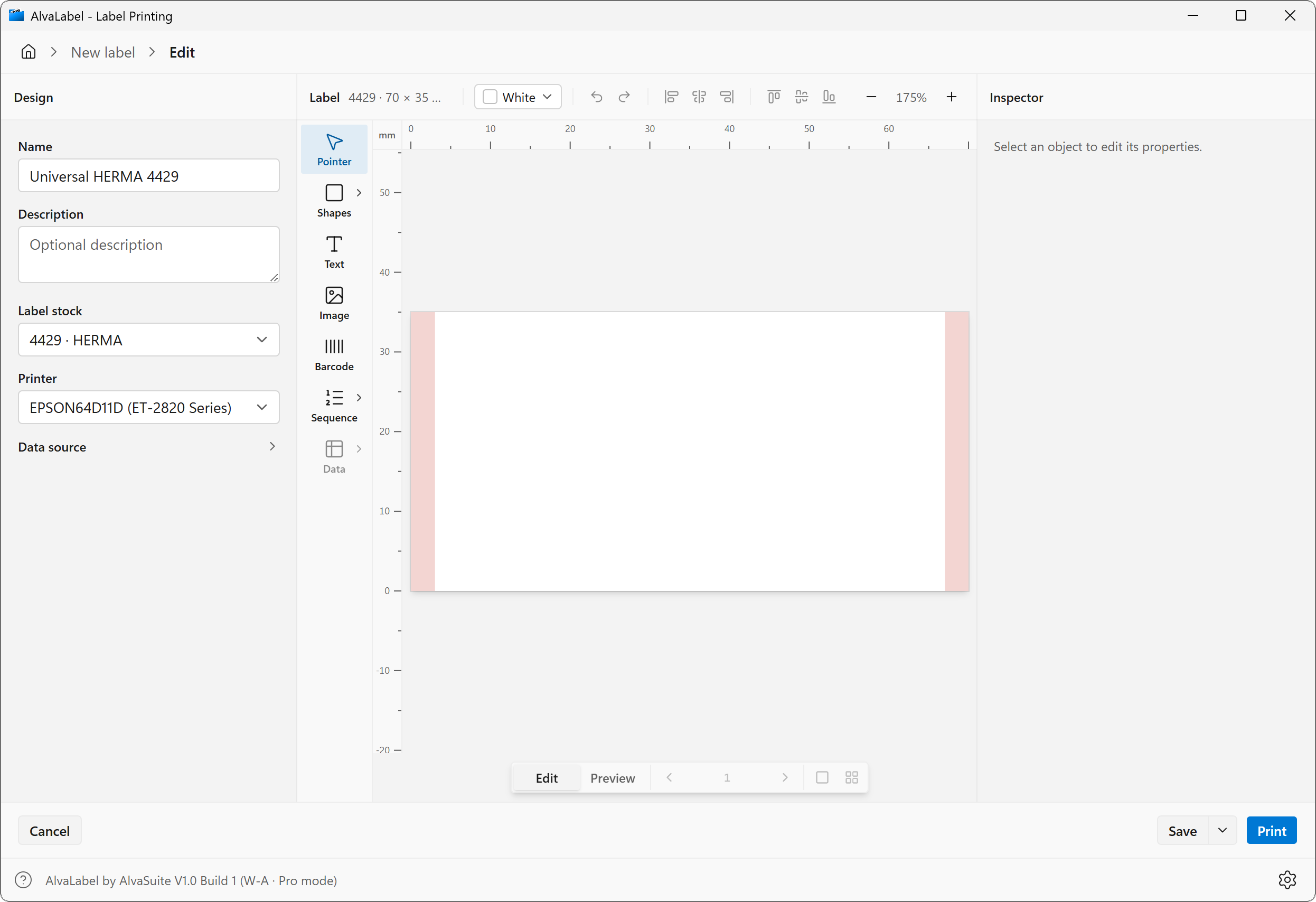
The same Epson with a HERMA 4429 label.
The clip test uses a 0.2 mm epsilon. Drivers round. Comparing floats from GetDeviceCaps to a millimetre catalog without slack produces flicker on packs that are almost flush with the printable edge.
When the overlay is red, the same difference is applied as an inset on the label canvas — not as a suggestion, as a second rectangle the objects should stay inside. That is the only honest preview: the sheet view shows what the printer will eat, and the label view shows what you can still draw.
Do not blit at (0, 0)
The print path rasterizes each full sheet (labels, skipped cells, live catalog data) to a PNG at the stock’s real millimetre size. The obvious GDI call is “draw this bitmap at the origin.” That origin is the printable corner. The bitmap, however, is the paper. You would shift every label inward by the hardware margin and clip the opposite edge.
The blit is therefore:
StretchDIBits(
    hdc,
    -PHYSICALOFFSETX, -PHYSICALOFFSETY,   // destination origin = physical page
    PHYSICALWIDTH, PHYSICALHEIGHT,        // destination size = paper
    0, 0, pngWidth, pngHeight,            // source = full-sheet raster
    …
)
Negative destination origin is the whole point. GDI clips to the printable region for you; the pixels that fall in the hardware band simply never hit paper — which is exactly what the red overlay already promised.
The job runs on a dedicated thread. An HDC is thread-affine; creating it on the UI thread and printing from a worker is a quiet way to get GDI_ERROR on StartDoc. Pages go over a channel as PNG bytes so the Svelte side can keep rasterizing while GDI is busy.
Paper size without waiting on the driver
DocumentPropertiesW can take seconds on network and IPP queues. The picker asks for printable area whenever you highlight a stock, so that cost would freeze the UI.
The fast path: CreateDC with the printer’s current DEVMODE. If PHYSICALWIDTH/HEIGHT already match A4 or Letter within 8 mm, use that DC and skip the prompt. Only if the driver is sitting on the wrong paper do we open the printer, force DMPAPER_A4 or DMPAPER_LETTER through DocumentPropertiesW, and cache the DEVMODE for the next call. Preferences (“Options” on the print screen) still go through the driver’s own dialog; that result is cached per printer × sheet as well.
Millimetres on the screen are not 96 dpi
The designer claims the canvas is the label. CSS’s reference density is 96 px per inch, so a naive mm × 96 / 25.4 is only right on a monitor that really is 96 dpi. HiDPI laptops are not. LOGPIXELSX is the effective DPI after Windows scaling, which is what the WebView uses for CSS pixels. The physical pixel pitch is closer to HORZRES / HORZSIZE, or GetDpiForMonitor(…, MDT_RAW_DPI).
AlvaLabel’s scale is:
css_px_per_mm = (physical_px_per_mm) × 96 / effective_dpi
so a 70 mm cell is 70 mm on the glass, not 70 × (96/25.4) CSS pixels that happen to look smaller on a 180 dpi panel. Fallback is still 96/25.4 if the monitor caps are nonsense.
What this is not
We do not try to “fix” a driver that lies about its printable area. If the Epson reports 3 mm and then clips at 4 mm, the overlay will be optimistic. The point of asking Windows at all is to be no worse than Word, and much better than a browser that never asked.
The AlvaLabel product page has the same two overlays in the marketing copy. This note is the GDI underneath.